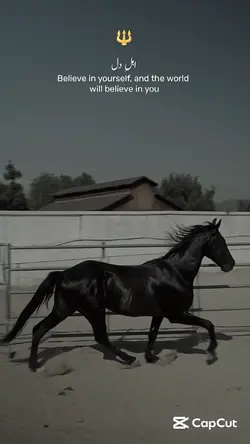
Discover the latest new trends CapCut template shyari to elevate your video editing experience. Explore a wide variety of stylish shyari templates perfect for expressing emotions, storytelling, or sharing poetry on social media. With CapCut’s user-friendly interface, you can quickly personalize your videos with text overlays, music, and visual effects, making your shyari stand out. Whether you're a content creator, poetry lover, or influencer, these trending templates are designed to save you time and spark creativity. Start using the new trends CapCut template shyari to connect with your audience and make your videos more engaging. Benefit from seamless editing, high-quality exports, and a growing library of trendy designs to keep your content fresh and relevant.
Make the words feel like part of the video
The templates above are built around Urdu shayari, short lines, motivational dialogue, and shayari slow-motion edits. That makes the words the starting point of the edit. A CapCut shayari template works best when the footage, timing, and text all support the same thought.
Choose the layout by the amount of text
One sentence or quotation can sit comfortably in a text-first layout with one clear reading moment. A longer verse needs a template that reveals the lines separately; shrinking an entire poem into one frame makes both the words and the image harder to follow. Keep each line break where the meaning naturally pauses, and give the most important line enough reading time before the next transition.
The tone of the words can guide the pace. Motivational dialogue can handle stronger cuts and more direct movement. A reflective line or Urdu shayari usually works better with fewer changes, especially when the text is meant to stay with the viewer for a moment.
Use footage that leaves space for the line
A close-up, still photo, quiet street, or slow-moving clip can support a poetry video without competing with the text. When a template contains several media slots, use clips with a shared subject, location, or lighting so the scene changes do not break the mood. Avoid placing key words over signs, faces, or other busy details in the background.
After replacing the sample text and media, watch the result at phone size and read every line as it appears. The final frame should stay long enough for the last sentence to settle. If the edit feels like one thought unfolding from beginning to end, the template is working; if the words feel pasted on top, simplify the footage or slow the sequence down.
FAQs
Q: Should I write shayari in Urdu, Hindi, or Roman Urdu?
A: Use the script your intended audience can read most comfortably. Urdu may suit readers who already know the script, while Hindi or Roman Urdu can be easier for other audiences. Keep the chosen form consistent within each line and preview it at phone size before publishing.
Q: Can I make a shayari video with only one photo?
A: Yes, if you choose a text-first or one-photo layout. One expressive image can support a short verse when it leaves enough clear space for the words. If the selected template expects several visual changes, use a simpler layout instead of repeating the same photo in every media slot.
Q: How much shayari text should I place on one screen?
A: Keep each screen to one short thought or a few brief lines that can be read before the transition. Split a longer verse at natural pauses instead of shrinking the text to fit. Preview at phone size and shorten the wording if the screen changes before you finish reading.
Q: What kind of background works best for a shayari video?
A: Choose an uncluttered photo or a slow clip with clear space for the words. A quiet background, consistent lighting, and limited movement help the text remain the main focus. If the image contains many faces, signs, or bright details, move the text or choose a calmer shot.
Q: Where should I break long shayari lines on screen?
A: Break the text where the meaning naturally pauses, not simply after the same number of words. Keep connected phrases together and avoid leaving one short word on a line by itself. Read the verse aloud once; the places where you pause are usually good points for a new line or screen.
Q: Should I choose a text-first or slow-motion shayari template?
A: Choose a text-first layout when the verse is longer or needs careful reading. Slow-motion layouts work better for one short line paired with a visible emotional moment. If both words and movement compete for attention in the preview, simplify one of them before adding more effects.
Q: Can I use several clips without distracting from the shayari?
A: Yes, when the clips feel visually related and each transition leaves enough time to read. Use footage from the same subject, place, or lighting style, and avoid changing the scene in the middle of an important line. Reflective verses often work better with fewer, longer shots.