

A well-designed Christmas wishlist template can make your holiday planning more joyful and stylish. This article discusses the benefits and the top 6 Christmas wishlist template downloaders, such as CapCut, PosterMyWall, Canva, Adobe Express, Slides Carnival, and Adobe Stock. Finally, we will create a comparison table to evaluate all the Christmas wishlist presentation template downloaders based on different factors and provide the top 6 template ideas. Start exploring and find your favorite Christmas wishlist templates today!
What are Christmas wishlist templates, and why are they essential
Christmas wishlist templates are pre-designed templates that let you list, organize, and personalize your birthday gift wishes. These templates mostly contain festive elements, such as Christmas trees, snowflakes, candy canes, and Santa icons, making them ideal for capturing the joyful holiday spirit. They are available in printable or digital formats, making it easy to share your wishlist creatively with your loved ones.
Christmas wishlist templates are quite vital because they make holiday planning simple and stress-free. They help you to prioritize gifts, track ideas, and avoid any last-minute confusion. Other than organization, these templates add a festive and personal touch to your celebrations. In crux, they help you turn the joy of giving and receiving into a more thoughtful experience.

Top 6 Christmas wishlist template downloaders to try today
CapCut
CapCut is a versatile and intuitive video editing software, renowned for its powerful editing and AI-powered features. It is also an excellent tool for downloading Christmas wishlist templates, offering features such as AI design that transforms your text prompts into attractive templates powered by Seedream 4.0 and Nano Banana models. You can further enhance the AI-generated template with rich editing and AI-powered tools, such as inpaint, expand, remove, and upscale. So, download CapCut today and utilize its editing features to share the Christmas holiday joy in your own unique style.
- CapCut's AI design features convert your text prompts into eye-catching Christmas wishlist templates, utilizing AI models like Seedream 4.0 and Nano Banana.
- Customize your Christmas wishlist template with editing features, like text, stickers, frames, filters, and effects.
- The tool allows you to export templates in multiple formats, like JPG, PNG, and PDF, enhancing accessibility.
- Enhance your templates with AI-powered features, like background remover, inpaint, expand, remove, and upscale to make them visually appealing.
- Some advanced features require an active internet connection.
Steps to use CapCut to download Christmas wishlist templates
- STEP 1
- Access the AI design feature
First, open CapCut and click the "AI design" feature from the left-hand panel. Next, write a clear and detailed prompt for your wishlist template. Once done, click the "Send" button to generate the Christmas wishlist template.

- STEP 2
- Edit and enhance the wishlist template
Once the template has been generated, click the "+" button to enhance it with various visual elements, such as text, templates, stickers, shapes, designs, frames, and a brand kit, to make it visually appealing.

You can also click on "AI tools" to improve the wishlist template with various AI-powered features, such as inpaint, expand, remove, and upscale.

- STEP 3
- Export the Christmas wishlist template
Once satisfied with the wishlist template, click the "Download" option at the top of the screen. Next, click "Download" to download the wishlist template or "Copy as PNG" to copy it.

Canva
Canva is an intuitive and robust design platform, renowned for its advanced editing capabilities. It offers an AI image generator feature, enabling you to convert your text prompts into eye-catching Christmas wishlist templates. Other unique features include a variety of visual elements, brand kits, and collaboration tools, making it perfect for real-time collaboration.
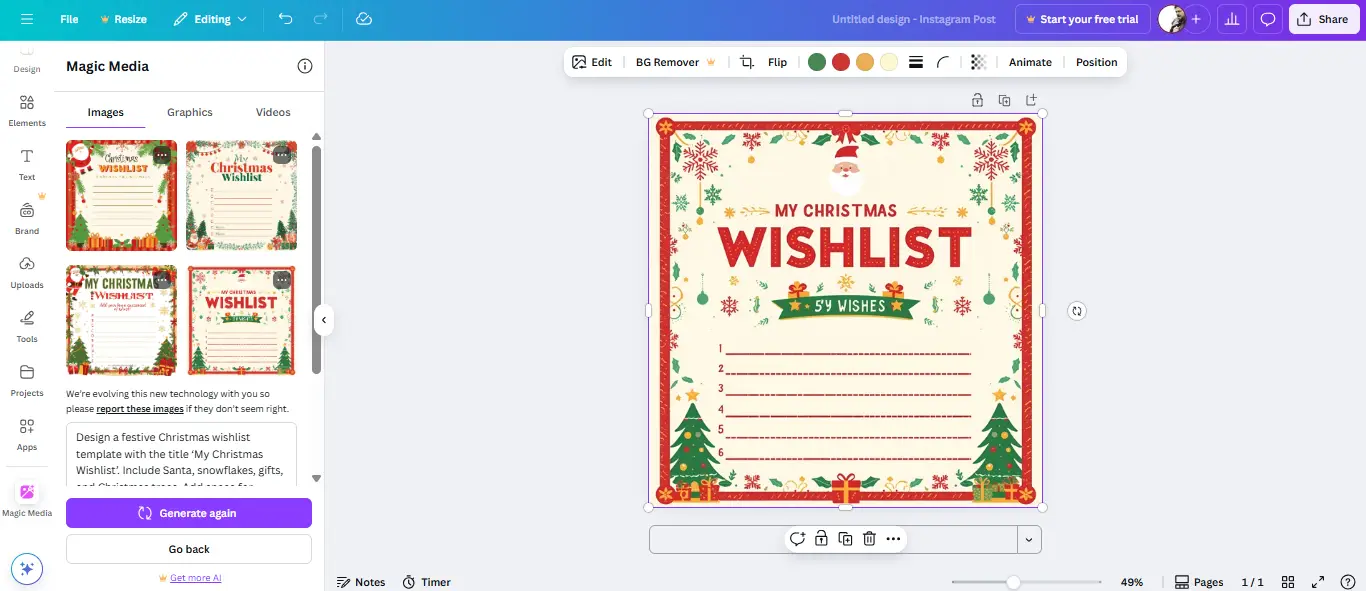
- The AI image generator integrates seamlessly into the canvas, allowing you to generate high-quality wishlist templates.
- Canva offers thousands of holiday-ready templates, photo assets, fonts, and icons, curated especially for Christmas themes.
- It offers team collaboration features, allowing multiple teams to edit, comment, and contribute to the same design in real-time.
- Canva offers limited precision with typography and formatting.
Adobe Express
Adobe Express is a versatile design platform that blends simplicity with power, making it perfect for users looking for strong visuals without complex software. One of its unique features is the AI image generator, which uses the Adobe Firefly model to transform ordinary text prompts into custom graphics and attractive Christmas wishlist templates. Plus, it also provides animated effects and brand consistency tools, such as brand kits and Creative Cloud libraries.

- Use Adobe Express's AI image generator feature to build creative Christmas wishlist templates quickly.
- The tool offers many professional, polished templates along with editing tools to ensure your templates remain cohesive.
- It lets users collaborate, share, and resize the wishlist templates for different platforms.
- Some advanced features and high-quality exports are locked behind a paywall.
PosterMyWall
PosterMyWall is a powerful design platform, designed for both beginners and professionals, offering impressive editing features. One of its unique features is its text-to-image generator, which lets you transform your text prompts into attractive wishlist templates. Beyond this, it also provides thousands of themed templates, animated stickers, icons, easy background removal tools, and resizing tools to adjust the template for various platforms.

- PosterMyWall allows you to generate multiple wishlist templates from text prompts, choose styles, and aspect ratios.
- It offers different stickers, icons, animated options, and background removal tools to make polished visuals.
- The tool provides features to plan your content calendar, schedule posts, and publish them directly.
- Some advanced features, like AI background removal and watermark-free exports, require a premium subscription.
Slides Carnival
Slides Carnival is an AI-powered platform that allows you to make attractive templates and presentations quickly. Its AI presentation maker feature enables you to create fully designed slides by just entering a topic or prompt, saving time and improving creativity. The tool offers a variety of professional designs, customizable themes, and structured layouts, perfect for personal and business presentations.

- The AI presentation maker feature allows you to generate ready-to-edit Christmas wishlist templates based on your text prompts.
- It offers over 2000 free templates, spanning several themes and styles.
- The tool saves time by automatically suggesting layouts, colors, and slide structures.
- Some templates require you to credit the creator, especially if you plan to use them commercially.
Adobe Stock
Adobe Stock is a high-end stock asset platform providing millions of royalty-free images, videos, templates, 3D assets, and audio. It recently added Firefly-powered generative AI features, allowing you to create eye-catching Christmas wishlist templates from text prompts. Additionally, its seamless integration with Adobe Creative Cloud apps makes it particularly useful for a smooth workflow.

- You can access the AI image generator feature via Adobe Firefly, allowing you to transform visuals based on text prompts.
- Adobe Stock contains an extensive collection of professional-grade assets, such as standard, premium, 3D, templates, and audio, to give aesthetic consistency to your visuals.
- It offers seamless Creative Cloud integration, allowing you to access Adobe Stock assets within Adobe apps.
- Premium, high-resolution, or 3D content requires credits, making them expensive for hobbyists and casual users.
Christmas wishlist template downloaders: A brief comparison

Top 6 Christmas wishlist template ideas of 2025
- Classic minimal wishlist: This wishlist template features soft red and green tones with a simple layout for writing down your wishes and gift priorities. It is perfect for adults and kids who want a traditional aesthetic. CapCut's AI design allows you to create classic looks instantly from ordinary text prompts.
- Kids' dream wishlist: This template adds a colorful vibe for children, containing playful fonts, cartoon icons, and sections for favorite toys or games. Parents can add different stickers or photos to make it attractive to kids. CapCut's stickers and text tools make it easy to customize these Christmas wishlist templates.
- Family gift planner template: This template organizes gifts by recipients, like mom, dad, siblings, and friends, enabling you to track budgets and ideas efficiently. It's practical yet festive, featuring soft patterns or icons. CapCut lets you design interactive, editable templates to share with your loved ones.
- Personalized photo wishlist: Mix your favorite Christmas sections for gifts, goals, and memories. It transforms an ordinary wishlist into a memory board. CapCut's editing and AI tools, such as background remover, inpaint, and upscale, allow you to create attractive personalized photo wishlist templates.
- Digital wishlist collage: This template features a modern visual board where you can add product images, prices, and links to your favorite items. It's ideal for creating a Pinterest-type wishlist. CapCut's templates, designs, and frames make this design effortless.
- Luxury wishlist template: For individuals who love sophistication, this layout utilizes elegant fonts, gold accents, and high-quality imagery for luxury gift planning. CapCut's high-quality exports and AI upscale tool allow you to maintain clear and sharp visuals for sharing across different platforms.
Conclusion
Christmas wishlist templates are more than just listing gifts; it's about expressing your holiday spirit in style. This article discussed the importance and the top 6 Christmas wishlist template downloaders, like CapCut, PosterMyWall, Canva, Adobe Express, Slides Carnival, and Adobe Stock, each offering its own perks and drawbacks. We also looked at the best Christmas wishlist template ideas, from minimal styles to engaging digital layouts. Among all the tools mentioned here, CapCut stands out as the best one due to its impressive features, such as AI design, editing tools, and AI-powered functions like inpaint, expand, remove, and upscale. So, get CapCut now and utilize its advanced editing features to make your Christmas planning unforgettable.
FAQs
- 1
- What kind of Christmas wishlist template is best for kids?
A fun and colorful design containing large fonts, playful icons, and space for drawings is perfect for kids. Templates containing Santa, reindeer, and snowflakes keep the kids interested and make the experience magical. Using engaging templates that allow editing is also an excellent choice. Tools, like CapCut, let you add different stickers, text, shapes, frames, and designs, making the wishlists more attractive and personalized for kids.
- 2
- How to design your own free printable Santa Christmas wishlist template from scratch?
To design a Santa Christmas wishlist template from scratch, CapCut is the best choice. Use its AI design tool to convert your text prompt into an engaging wishlist template. Ensure that your prompt is specific and detailed. After that, use stickers and Christmas-themed fonts to make the template visually appealing. Include sections, such as "Good Deeds" or "Thankyou Santa" to personalize the layout.
- 3
- Where can I get a free printable Santa Christmas wishlist template?
You can find Santa Christmas wishlist templates on different platforms, such as Canva and PosterMyWall, which offer festive templates ready for quick downloads. These templates can be customized to suit your child's preferences. For a unique look, search for ones featuring Santa or holiday borders. CapCut also offers Christmas wishlist templates that you can edit using its editing and AI-powered features to prepare a magical wishlist for the holidays.